Introduction
Trail cameras have become useful tools for observing wildlife, monitoring outdoor areas, documenting animal activity, and keeping an eye on locations where a conventional camera may not be practical. Unlike ordinary cameras that require someone to operate them continuously, a trail camera can remain positioned outdoors and automatically capture images or video when its motion sensor detects activity.
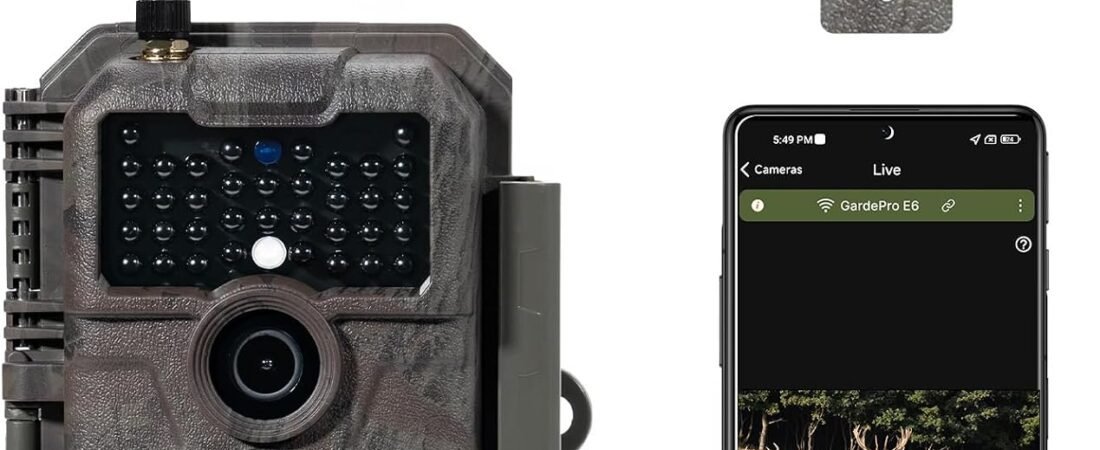
The GardePro E6 WiFi Trail Camera is designed around this type of unattended outdoor monitoring. The original E6 combines a motion-activated camera with local WiFi and Bluetooth connectivity, allowing a compatible smartphone or tablet to communicate directly with the camera when within range. GardePro’s current documentation distinguishes the original E6 from newer E6 2.0 models, so it is important not to automatically apply specifications from the newer generation to the original product.
The E6 uses a 2.4 GHz WiFi connection and Bluetooth pairing. Rather than connecting to a household WiFi router, the camera creates its own local WiFi access point for communication with a nearby mobile device. GardePro lists the original E6 at up to approximately 45 feet, or 13 meters, of WiFi range in an open area, with Bluetooth pairing extending to approximately 10 meters.
This distinction is particularly important for people who expect a trail camera to provide remote internet access. The original E6 is not a cellular trail camera and does not operate like a cloud-connected security camera that can be accessed from anywhere through the internet. Instead, its WiFi system is intended for relatively short-range local communication.
The camera also incorporates a PIR motion sensor, infrared night vision, an integrated color screen, weather-resistant construction, and several power options. These features make the E6 relevant to wildlife observation, hunting-related field use where legal, property monitoring, and general outdoor documentation.
This guide explains how the GardePro E6 works, what its major features mean in practical terms, how it can be used, and what should be considered before installing a WiFi trail camera outdoors.
Understanding How the GardePro E6 WiFi System Works
The word “WiFi” can create confusion when it appears in a trail-camera product description.
The original GardePro E6 does not connect to a home router and then send photos over the internet. Instead, the camera creates a local wireless connection that allows a nearby smartphone or tablet to communicate with it through the GardePro app. GardePro specifically states that the camera creates a local WiFi access point and that no external internet connection is required for normal camera operation.
This setup has several practical implications.
If the camera is mounted in a wooded area, for example, a user can approach the camera with a compatible smartphone, establish the local connection, and use the application to access supported camera functions without physically removing the memory card.
However, the user must remain within the effective wireless range.
The WiFi feature therefore provides convenience for field access rather than unlimited remote monitoring.
This is different from cellular trail cameras, which use a cellular network and can potentially transmit information to a remote location where network coverage and service requirements are satisfied.
Key Features
WiFi Connectivity
The E6 uses 2.4 GHz WiFi for communication between the camera and a compatible mobile device.
GardePro’s documentation identifies a maximum WiFi range of approximately 45 feet or 13 meters for the original E6 when used in an open area.
This can make reviewing images in the field more convenient.
Instead of opening the camera housing and removing the memory card every time the user wants to inspect captured media, a nearby phone or tablet can communicate with the camera through the local wireless connection.
The practical range will depend on the environment. Trees, walls, vehicles, terrain, metal structures, and other obstacles can reduce wireless performance. GardePro notes that physical obstacles can significantly affect connection distance.
Bluetooth Pairing
The wireless system uses Bluetooth as part of the connection process.
According to GardePro’s current WiFi-camera documentation, Bluetooth is used for pairing and discovery, while 2.4 GHz WiFi is then used for functions such as photo/video transfer and live view.
This two-stage arrangement is worth understanding because users may see Bluetooth and WiFi listed as separate features.
They are not necessarily two independent methods for doing exactly the same thing.
Bluetooth helps establish the relationship between the mobile device and camera, while WiFi provides the higher-bandwidth local connection needed for transferring media and accessing supported camera functions.
External Antenna
The product is associated with an external antenna intended to support the camera’s wireless connectivity.
An antenna can be particularly relevant in an outdoor environment where the camera may be mounted away from the user and surrounded by vegetation or other obstacles.
However, an external antenna does not eliminate the physical limitations of WiFi.
The antenna should be properly installed and positioned according to the manufacturer’s instructions. GardePro’s troubleshooting guidance specifically recommends ensuring that the antenna is properly installed and tightened when connection problems occur.
PIR Motion Detection
The E6 uses a passive infrared, or PIR, sensor to detect movement.
GardePro lists a detection angle of approximately 70 degrees, a detection distance of up to approximately 75 feet or 22 meters, and a trigger speed of about 0.5 seconds for the original E6.
These specifications help explain how the camera is intended to operate.
The PIR sensor does not continuously record everything in front of the camera. Instead, it detects changes associated with moving subjects and triggers the camera according to its configured settings.
The actual ability to capture an animal depends on several factors, including movement direction, distance, temperature, vegetation, camera placement, and environmental conditions.
Night Vision
Trail cameras need to operate when sunlight is unavailable, which makes infrared illumination an important part of their design.
The E6 uses infrared technology for nighttime imaging. This allows the camera to capture black-and-white images or video in low-light and dark conditions.
Nighttime image quality can be affected by distance, weather, subject movement, vegetation, and the reflectivity of the environment.
A camera’s advertised detection range should therefore not automatically be interpreted as a guarantee that every subject will be recorded with the same level of detail at that distance.
2.4-Inch Color Screen
The original E6 includes a 2.4-inch color screen for navigating camera settings and viewing captured media directly on the camera. GardePro’s product documentation identifies the screen as part of the E6’s design.
A built-in display can be particularly convenient during installation.
For example, after positioning the camera, a user can use the screen to review settings or inspect captured images without requiring another piece of equipment.
It also provides a straightforward way to access the camera when the user is working in an area where wireless connectivity is inconvenient.
IP66 Weather Resistance
Outdoor equipment needs protection from rain, dust, and other environmental exposure.
GardePro identifies the original E6 as having an IP66 weather-resistance rating.
An IP rating describes protection against specific forms of environmental exposure under defined testing conditions. It should not be interpreted as a guarantee that the camera can withstand every possible outdoor situation indefinitely.
Proper installation remains important.
The camera should be positioned and maintained according to the manufacturer’s instructions, particularly in environments with heavy rain, snow, mud, dust, or prolonged exposure to extreme weather.
Multiple Power Options
The original E6 can operate using eight AA batteries, and GardePro also documents external power options. The company’s E6 information identifies support for an external 12V DC input and compatibility with its SP350 solar panel system.
This provides flexibility depending on where the camera is installed.
Battery operation can be convenient for temporary deployments, while external or solar power may be useful when the camera is expected to remain in place for longer periods.
Power consumption can vary depending on settings, environmental conditions, frequency of activation, and wireless use.
How It Can Be Used
Wildlife Observation
Wildlife observation is one of the most obvious applications for a trail camera.
The E6 can be positioned near an area where animals are likely to pass, such as a trail, clearing, water source, or other suitable location.
The motion sensor can activate the camera when movement is detected, allowing users to document activity without remaining physically present.
This can be useful for understanding which animals visit an area and at what times.
However, wildlife should not be disturbed simply to improve camera positioning. Installation should be performed in a way that minimizes unnecessary disruption to animals and their habitat.
Hunting-Related Scouting
Trail cameras are commonly used for wildlife scouting.
The E6 can provide information about animal movement patterns, timing, and presence in a particular location.
Where hunting is involved, users should always check local hunting regulations. Some jurisdictions impose specific rules concerning trail cameras, baiting, wildlife monitoring, or electronic equipment.
The camera itself does not determine whether a particular use is legal.
Property Monitoring
A trail camera can also be used to observe outdoor areas around a property.
Possible applications include monitoring a driveway, gate, garden, shed, outbuilding, or other outdoor location.
The E6’s local WiFi system can make it easier to review captured images when the user is physically nearby.
It should not, however, be confused with an internet-connected home security camera.
If continuous remote access from another city or location is required, a cellular security camera or another internet-connected system may be more appropriate.
Garden and Outdoor Areas
Gardeners may use motion-activated cameras to observe wildlife visiting plants, vegetable gardens, bird-feeding areas, or other outdoor spaces.
A trail camera can reveal activity that occurs overnight or when nobody is outside.
This can help identify whether damage is associated with deer, raccoons, rabbits, birds, or other animals.
Farm and Rural Property Monitoring
On larger properties, a trail camera can provide a simple way to document activity in locations that are not constantly occupied.
The camera can be positioned near fences, gates, storage areas, livestock-adjacent locations, or wildlife corridors where permitted and appropriate.
Because the original E6 uses local WiFi rather than cellular communication, the user still needs to physically approach the camera to access its wireless functions.
Planning the Camera Location
Consider the Direction of Movement
PIR sensors respond to movement, but not every direction of movement is equally easy to detect.
For wildlife applications, positioning the camera so that animals cross through the detection zone rather than moving directly toward the camera can sometimes improve the likelihood of detection.
The exact result depends on the sensor and environmental conditions.
Avoid Excessive Vegetation
Branches and tall grass can move in wind and potentially trigger a motion sensor.
Vegetation close to the camera can also interfere with the image.
Before leaving the camera in place, inspect the detection zone and remove only vegetation that can legally and safely be altered.
Consider the Sun
Direct sunlight can affect image quality and potentially create glare.
Where practical, camera orientation should take the movement of the sun into account.
A camera facing directly into low morning or evening sunlight may produce less useful images than one positioned with the lighting conditions considered.
Mount at an Appropriate Height
The ideal height depends on the intended subject.
A camera aimed at small animals may need a different mounting position than one intended to observe larger wildlife.
Mounting too high can produce a downward perspective, while mounting too low can expose the camera to mud, water, or accidental contact.
Test Before Leaving
One of the advantages of the E6 is its built-in screen and local wireless connectivity.
After mounting the camera, users can test the field of view and settings before leaving the area.
This can reduce the likelihood of returning later only to discover that the camera was pointed too high, too low, or toward an obstruction.
Who It May Be Suitable For
Wildlife Enthusiasts
People interested in observing wildlife without constantly being present can use motion-triggered photography to document animal activity.
Hunters
Where legal, hunters may use trail cameras as part of scouting and wildlife observation.
Local regulations should always be checked because rules governing electronic wildlife-monitoring equipment differ between locations.
Property Owners
The camera can provide another way to document activity in outdoor areas where local wireless access is sufficient.
Gardeners
Gardeners interested in identifying nocturnal animals or other visitors can use a trail camera to observe activity that would otherwise be difficult to see.
Outdoor Researchers and Hobbyists
For non-commercial observation projects, a trail camera can provide a convenient way to collect images over time.
The camera can remain in place while the user returns periodically to review the recorded material.
Users Who Prefer Local Wireless Access
The E6 may be particularly relevant to users who want wireless image access without a cellular subscription.
The tradeoff is that the user needs to be physically near the camera.
Important Things to Consider
WiFi Does Not Mean Internet Access
This is perhaps the most important point to understand.
The original E6 creates a local WiFi connection and does not connect to a household router. GardePro explicitly states that it communicates directly with nearby smartphones or tablets through its own WiFi access point.
Therefore, it should not be selected with the expectation of viewing the camera remotely from anywhere.
The Original E6 Is Different From E6 2.0
GardePro currently sells newer E6 2.0 models with substantially different specifications.
For example, the E6 2.0 is advertised with dual antennas, up to 165 feet of WiFi range, 4K video, a 110-degree field of view, and a 0.3-second trigger speed.
Those specifications should not automatically be attributed to the original E6.
The Amazon product linked here is associated with the earlier E6 configuration, so users should verify the exact model before relying on specifications found elsewhere online.
Wireless Range Depends on Conditions
GardePro’s stated original E6 WiFi range is approximately 45 feet in an open area.
Real-world range can be lower.
Trees, walls, metal objects, terrain, vehicles, and other obstacles can interfere with the signal. GardePro specifically warns that physical obstacles can significantly reduce range.
Battery Choice Matters
GardePro’s current troubleshooting guidance states that low battery levels can interfere with WiFi connections and recommends high-quality non-rechargeable batteries for cameras powered by eight AA cells. The company specifically warns against using eight 1.2V NiMH rechargeable batteries in this configuration because of voltage behavior and performance concerns.
Users should therefore follow the current manual and manufacturer’s battery recommendations rather than assuming every AA battery type will provide identical performance.
Weather Resistance Is Not Weather Immunity
An IP66 rating provides useful protection, but outdoor installation still requires planning.
Water can enter through damaged seals, improperly closed compartments, or compromised components.
After severe weather, it is sensible to inspect the camera and mounting system.
Memory Storage
A trail camera’s ability to record depends on its storage configuration.
Users should confirm the supported memory-card specifications in the current manual before purchasing or installing a card.
The card should also have sufficient capacity for the selected photo and video settings.
Motion Detection Is Not Perfect
No motion-triggered camera can guarantee that every moving subject will be captured.
Fast-moving animals, subjects outside the detection zone, obstructions, unsuitable placement, temperature differences, and other factors can affect detection.
Users should treat trail-camera footage as observational data rather than a complete record of everything that happened in front of the camera.
Privacy and Responsible Monitoring
Property monitoring introduces privacy considerations.
If the camera is positioned where it may capture neighbors, visitors, public spaces, or other people’s private activities, users should consider applicable privacy laws and local regulations.
A trail camera intended for wildlife observation should ideally be aimed toward the intended wildlife area rather than toward places where people reasonably expect privacy.
When monitoring a property, clear rules and responsible placement can reduce unintended recording of people.
The same principle applies when using the camera around shared outdoor spaces.
Comparing General Trail Camera Categories
WiFi Trail Cameras
WiFi trail cameras such as the original E6 use a local wireless connection.
Their main advantage is convenient nearby access to photos, videos, and camera settings without necessarily removing the memory card.
The limitation is range. The user needs to be close enough to establish the local connection.
Cellular Trail Cameras
Cellular trail cameras use mobile networks to transmit information.
This can make remote access possible over much greater distances, provided that the camera has adequate cellular coverage and an appropriate service plan.
The tradeoff can include subscription costs, cellular availability, and greater power requirements.
Traditional SD Card Trail Cameras
A basic trail camera may simply record images and video to a memory card.
This approach can be straightforward and does not require wireless connectivity.
However, reviewing footage generally requires physically accessing the camera or removing the card.
Home Security Cameras
Home security cameras are generally designed for fixed installations around buildings and may use home WiFi or wired internet.
They can offer remote viewing over the internet.
A trail camera differs because it is designed for outdoor, motion-triggered, often battery-powered operation and can be placed in areas without household network infrastructure.
Game Cameras With Solar Power
Solar-assisted trail cameras can reduce the need for frequent battery replacement.
They may be useful for long-term outdoor deployments.
However, solar performance depends on sunlight, panel placement, weather, and power requirements.
Practical Setup Process
A careful setup can improve the usefulness of a trail camera.
First, identify the area you want to observe.
Next, examine the likely movement path of the intended subjects.
Position the camera so the detection zone covers the desired area without excessive obstruction.
Install the batteries or approved external power source according to the manufacturer’s instructions.
Insert a compatible memory card if required.
Turn the camera on and verify the date, time, capture mode, detection settings, and other relevant configuration options.
Use the built-in display or GardePro application to check framing where possible.
Finally, close and secure the housing before leaving the camera outdoors.
The antenna should be installed correctly and tightened as recommended by GardePro.
Maintenance and Long-Term Use
A trail camera can remain outdoors for extended periods, but periodic inspection is still useful.
Check the housing for dirt, moisture, insects, or damage.
Inspect the antenna and mounting strap.
Review battery condition.
Make sure the camera remains pointed in the intended direction.
Vegetation can grow or move over time, gradually changing the camera’s field of view.
If the camera is deployed for months, environmental conditions may change significantly between seasons.
A location that works well in summer may become obstructed by snow, leaves, or vegetation during another season.
Frequently Asked Questions
Is the GardePro E6 a WiFi camera?
Yes. The original E6 uses 2.4 GHz WiFi for local communication with compatible smartphones or tablets.
Does the E6 connect to a home WiFi router?
No. GardePro states that the original E6 creates its own local WiFi access point rather than connecting to a household router.
Can I view the camera remotely from another city?
The original E6 is not designed as an internet-connected remote camera. Its WiFi connection is local, so the user generally needs to be within the camera’s wireless range.
How far does the WiFi reach?
GardePro lists approximately 45 feet or 13 meters for the original E6 in an open area. Obstacles can reduce the effective range.
Does the E6 use Bluetooth?
Yes. Bluetooth is used for pairing and discovery, while the 2.4 GHz WiFi connection handles higher-bandwidth communication such as media transfer and live view.
Does the camera have an external antenna?
The E6 configuration includes an antenna, and GardePro’s troubleshooting guidance recommends making sure the antenna is correctly installed and tightened.
What is the trigger speed?
GardePro identifies the original E6 with a trigger speed of approximately 0.5 seconds.
How far can the motion sensor detect?
GardePro lists a detection distance of up to approximately 75 feet or 22 meters for the original E6 under stated conditions.
What is the detection angle?
The original E6 is listed with a PIR detection angle of approximately 70 degrees.
Does the E6 have a screen?
Yes. The original E6 includes a 2.4-inch color display for navigating settings and reviewing images and videos.
Can it record at night?
Yes. The camera uses infrared night vision for recording in dark conditions.
Is the GardePro E6 waterproof?
The original E6 is identified with an IP66 weather-resistance rating.
What batteries does the E6 use?
GardePro’s E6 documentation identifies eight AA batteries as a power option. The manufacturer recommends high-quality non-rechargeable batteries for this configuration and provides specific guidance concerning battery voltage and WiFi operation.
Can the E6 use solar power?
GardePro identifies compatibility with its SP350 solar panel system as an external power option for the E6.
Can the camera work without WiFi or internet?
Yes. The original E6 can operate independently and save captured photos and videos to a memory card without an external WiFi or internet connection.
Can I connect the E6 to a computer?
GardePro’s current product documentation states that its WiFi trail cameras connect through the mobile application to smartphones or tablets rather than directly to a PC.
Is the E6 2.0 the same camera?
No. The E6 2.0 is a newer generation with different specifications. GardePro lists features such as 4K video, dual antennas, a 110-degree field of view, and longer wireless range for the E6 2.0.
Can the E6 be used for property monitoring?
It can be used for outdoor property monitoring where appropriate, but users should consider privacy requirements and local laws before positioning a camera where people may be recorded.
Can it be used for wildlife observation?
Yes. Motion-triggered trail cameras are commonly used for wildlife observation, and the E6’s PIR detection and infrared night vision make it suitable for this type of application.
Does WiFi require a monthly subscription?
GardePro describes the original E6 as using local WiFi and Bluetooth with its GardePro Mobile app and states that no monthly fee or remote control is required for this local connection.
Conclusion
The GardePro E6 WiFi Trail Camera is designed for users who want a motion-activated outdoor camera with convenient local wireless access. Its combination of PIR detection, infrared night vision, a built-in color screen, weather-resistant construction, and WiFi/Bluetooth connectivity gives it a range of possible applications in wildlife observation, outdoor monitoring, property documentation, gardening, and hunting-related scouting where permitted.
One of the most important characteristics of the original E6 is how its wireless system works. It does not connect to a home router or provide internet-based remote viewing. Instead, the camera creates a local 2.4 GHz WiFi connection that allows a nearby smartphone or tablet to communicate with it. GardePro lists approximately 45 feet of WiFi range in an open area, while environmental obstacles can reduce that distance.
The external antenna is part of the camera’s wireless design, but it does not remove the limitations created by distance, vegetation, walls, metal structures, or other obstacles.
The camera also deserves to be distinguished from the newer E6 2.0 generation. The current E6 2.0 has substantially different specifications, including longer wireless range and 4K recording capabilities, so information about that model should not automatically be applied to the original E6.
For users considering a trail camera for local wildlife observation or outdoor monitoring, understanding these distinctions is important. The E6’s local wireless approach can make field access more convenient while maintaining a relatively straightforward standalone operating model.
As with any outdoor camera, careful placement, appropriate power management, regular maintenance, responsible monitoring, and awareness of local regulations all contribute to a more useful setup.